
Microsoft Excel Posts & Guides
Window group buttons tools View tab MS Excel 2016
- September 10, 2016
- Posted by: SPiyush
- Category: Microsoft Excel Groups
Window group commands of View tab MS Excel
See Previous Post: Show group Zoom group buttons View tab Microsoft Excel 2016
So far now, we got to know about the first three groups of the View tab, in prior posts. They’re the Workbook Views group, the Show group and the Zoom group. In this post. we’ll discuss all the buttons tools of the Window group of the View tab ribbon. And, the previous post was on the Show group and the Zoom group.
The Normal, Headings, Zoom to Selection, Page Layout buttons etc. in prior posts was elaborated. Also, tools like Custom Views, Formula Bar, 100%, Ruler etc. were part of the discussion. Now, in the Window group, we’ll know about the ten (10) buttons individually.
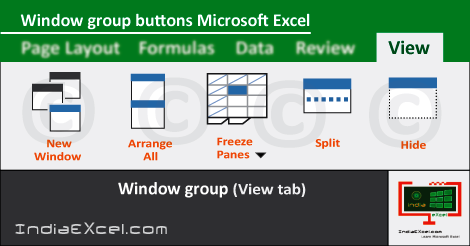
The New Window, Arrange All, Freeze Panes, Split, Hide, Unhide buttons are part of the Window-group. Also, the View Side by Side, Synchronous Scrolling, Reset Window Position and Switch Windows commands are part of Window-group.
Especially noticeable, the Freeze Panes and Switch Windows buttons are accompanied by tiny Drop down Menu button. The Freeze Panes, Freeze Top Row and Freeze First Column tools are part of the Freeze Panes drop down button.
Buttons description of Window group Excel – continued
First of all, the New Windows button opens a second window of same document; which helps users to work in different locations at the same time. Next, the Arrange All button lets users to arrange and stack all opened windows of the excel document. Stacking in this way makes easy to see all of windows at once.
Evenmore, the Freeze Panes button tool freezes a certain area of worksheet; so that it is visible while scrolling rest of the sheet. Then, the Split button lets users to make a division of the current window into different panes; which facilitates each separate scrolling.
The Hide button simply hides the current open window. While, the Unhide button helps to unhide the hidden window in Microsoft Excel. Moreover, the View Side by Side tool stacks workbooks side by side ; helping users to compare them easily by switching back and forth between workbooks. Further next, the Synchronous Scrolling lets users to scroll two excel documents at the same time.
Lastly, the Reset Window Position tool puts documents side by side in comparison; so that they equally share the current screen. Finally, the Switch Windows drop button helps to quickly jump to another open window in Microsoft Excel.
Window group tools of View tab in MS Excel 2016
- Window
- New Window
- Arrange All
- Freeze Panes
- Freeze-Top Row
- Freeze-First Column
- Split
- Hide
- Unhide
- View Side by Side
- Reset Window Position
- Switch Windows
See Next Post: Macros group buttons tools View tab Microsoft Excel 2016
Author:SPiyush
Leave a Reply Cancel reply
STAY UPDATED
RECENT POSTS
File tab Backstage View buttons introduction Microsoft Excel 2016
File tab Backstage View tools MS Excel 2016 In this post,...
Add numbers addition Microsoft Excel 2016 (adding in excel)
How to Add numbers (adding numeric) MS Excel See Previous...
Using Format Painter tool button Microsoft Excel 2016
How to use Format Painter button MS Excel See Previous...
Clipboard group Cut Copy and Paste Microsoft Excel 2016
Cut Copy Paste Clipboard group MS Excel 2016 See Previous...
Description of Font group buttons tools MS Excel 2016
Overview of Font group buttons Excel 2016 See Previous Post: Clipboard...
Alignment group tools buttons Microsoft Excel 2016
Commands of Alignment group Excel 2016 See Previous Post: Font group...
Number group buttons tools Formats Microsoft Excel
Number group tools commands Excel 2016 See Previous Post: Alignment Group...
Styles group buttons Home tab Microsoft Excel 2016

Styles group tools Microsoft Excel 2016 See Previous Post: Number group buttons commands...
Cells group tools description Home tab MS Excel 2016
Cells group buttons overview Microsoft Excel See Previous Post: Styles group...
Editing group buttons Home tab Microsoft Excel 2016

Editing group commands Microsoft Excel See Previous Post: Cells group buttons...
Clipboard, Font, Alignment, Number, Styles, Cells, Editing groups Microsoft Excel
Home tab groups buttons Microsoft Excel 2016 See Previous Post: Editing...
Tables group buttons Insert Tab ribbon Microsoft Excel
Insert Tab tools of Tables group Excel 2016 See Previous...
Illustrations group buttons of Insert Tab Excel 2016
Illustrations group tools Microsoft Excel 2016 See Previous Post: Tables group buttons...
File tab Backstage View buttons introduction Microsoft Excel 2016
File tab Backstage View tools MS Excel 2016 In this post,...
Add numbers addition Microsoft Excel 2016 (adding in excel)
How to Add numbers (adding numeric) MS Excel See Previous...
Using Format Painter tool button Microsoft Excel 2016
How to use Format Painter button MS Excel See Previous...
Clipboard group Cut Copy and Paste Microsoft Excel 2016
Cut Copy Paste Clipboard group MS Excel 2016 See Previous...
Description of Font group buttons tools MS Excel 2016
Overview of Font group buttons Excel 2016 See Previous Post: Clipboard...
Alignment group tools buttons Microsoft Excel 2016
Commands of Alignment group Excel 2016 See Previous Post: Font group...
Number group buttons tools Formats Microsoft Excel
Number group tools commands Excel 2016 See Previous Post: Alignment Group...
Styles group buttons Home tab Microsoft Excel 2016

Styles group tools Microsoft Excel 2016 See Previous Post: Number group buttons commands...
Cells group tools description Home tab MS Excel 2016
Cells group buttons overview Microsoft Excel See Previous Post: Styles group...
Editing group buttons Home tab Microsoft Excel 2016

Editing group commands Microsoft Excel See Previous Post: Cells group buttons...
Clipboard, Font, Alignment, Number, Styles, Cells, Editing groups Microsoft Excel
Home tab groups buttons Microsoft Excel 2016 See Previous Post: Editing...

Tables group buttons Insert Tab ribbon Microsoft Excel
Insert Tab tools of Tables group Excel 2016 See Previous...
Illustrations group buttons of Insert Tab Excel 2016
Illustrations group tools Microsoft Excel 2016 See Previous Post: Tables group buttons...










