
Microsoft Excel Posts & Guides
Connections group buttons Data tab Microsoft Excel 2016
- September 3, 2016
- Posted by: SPiyush
- Category: Microsoft Excel Groups
Connections group tools of Data tab MS Excel
See Previous Post: Get Transform group buttons Data tab MS Excel 2016
The third group, after the Get & Transform group is the Connections group. The Connections group is part of the Data tab ribbon in Microsoft Excel 2016. In the previous post, the New Query, Show Queries, From Table and the Recent Sources buttons have been discussed.
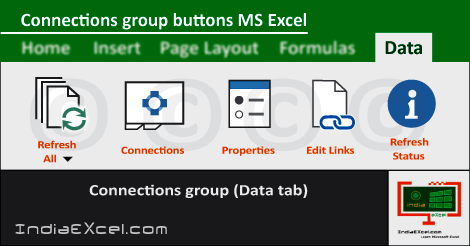
So, now we’ll know about the Data connections, Data properties and Links between the Data and Source in this group. This group has four buttons, and the Refresh All button is accompanied by Drop down Menu.
The buttons of the Connections-group are the Refresh All, Connections, Properties and the Edit Links. Also, the Refresh, Refresh Status, Cancel Refresh and Connection Properties tools are available in the Refresh All drop down button.
Connections group tools of Data tab Excel – continued
Firstly, the Refresh All button helps to fetch the latest data by refreshing all the connected sources. Further, the Connections tool helps to display all data connections for the current workbook which is open.
Even more, the Properties button is known as the Data Range Properties button. Especially, the Properties button offers and specifies that how the cells connected to a data source gets updated.
Also, this button sets what contents from the source will be displayed. Lastly, the Edit Links button helps to view all of the other files which’re linked to the spreadsheet. Furthermore, also the Edit Links button helps to update or remove the links.
So, in the next post, the Sort and Filter group buttons. They’re the Sort A to Z, the Sort Z to A and the Sort buttons etc. In addition’re the Filter, Clear, Reapply and the Advanced buttons.
Connections group commands of Data tab Excel 2016
- Connections
- Refresh-All
- Refresh
- Refresh Status
- Cancel Refresh
- Connection Properties
- Connections
- Properties (Data Range Properties)
- Edit Links
- Refresh-All
See Next Post: Sort Filter group buttons Data tab Microsoft Excel 2016
Author:SPiyush
Leave a Reply Cancel reply
STAY UPDATED
RECENT POSTS
File tab Backstage View buttons introduction Microsoft Excel 2016
File tab Backstage View tools MS Excel 2016 In this post,...
Add numbers addition Microsoft Excel 2016 (adding in excel)
How to Add numbers (adding numeric) MS Excel See Previous...
Using Format Painter tool button Microsoft Excel 2016
How to use Format Painter button MS Excel See Previous...
Clipboard group Cut Copy and Paste Microsoft Excel 2016
Cut Copy Paste Clipboard group MS Excel 2016 See Previous...
Description of Font group buttons tools MS Excel 2016
Overview of Font group buttons Excel 2016 See Previous Post: Clipboard...
Alignment group tools buttons Microsoft Excel 2016
Commands of Alignment group Excel 2016 See Previous Post: Font group...
Number group buttons tools Formats Microsoft Excel
Number group tools commands Excel 2016 See Previous Post: Alignment Group...
Styles group buttons Home tab Microsoft Excel 2016

Styles group tools Microsoft Excel 2016 See Previous Post: Number group buttons commands...
Cells group tools description Home tab MS Excel 2016
Cells group buttons overview Microsoft Excel See Previous Post: Styles group...
Editing group buttons Home tab Microsoft Excel 2016

Editing group commands Microsoft Excel See Previous Post: Cells group buttons...
Clipboard, Font, Alignment, Number, Styles, Cells, Editing groups Microsoft Excel
Home tab groups buttons Microsoft Excel 2016 See Previous Post: Editing...
Tables group buttons Insert Tab ribbon Microsoft Excel
Insert Tab tools of Tables group Excel 2016 See Previous...
Illustrations group buttons of Insert Tab Excel 2016
Illustrations group tools Microsoft Excel 2016 See Previous Post: Tables group buttons...
File tab Backstage View buttons introduction Microsoft Excel 2016
File tab Backstage View tools MS Excel 2016 In this post,...
Add numbers addition Microsoft Excel 2016 (adding in excel)
How to Add numbers (adding numeric) MS Excel See Previous...
Using Format Painter tool button Microsoft Excel 2016
How to use Format Painter button MS Excel See Previous...
Clipboard group Cut Copy and Paste Microsoft Excel 2016
Cut Copy Paste Clipboard group MS Excel 2016 See Previous...
Description of Font group buttons tools MS Excel 2016
Overview of Font group buttons Excel 2016 See Previous Post: Clipboard...
Alignment group tools buttons Microsoft Excel 2016
Commands of Alignment group Excel 2016 See Previous Post: Font group...
Number group buttons tools Formats Microsoft Excel
Number group tools commands Excel 2016 See Previous Post: Alignment Group...
Styles group buttons Home tab Microsoft Excel 2016

Styles group tools Microsoft Excel 2016 See Previous Post: Number group buttons commands...
Cells group tools description Home tab MS Excel 2016
Cells group buttons overview Microsoft Excel See Previous Post: Styles group...
Editing group buttons Home tab Microsoft Excel 2016

Editing group commands Microsoft Excel See Previous Post: Cells group buttons...
Clipboard, Font, Alignment, Number, Styles, Cells, Editing groups Microsoft Excel
Home tab groups buttons Microsoft Excel 2016 See Previous Post: Editing...

Tables group buttons Insert Tab ribbon Microsoft Excel
Insert Tab tools of Tables group Excel 2016 See Previous...
Illustrations group buttons of Insert Tab Excel 2016
Illustrations group tools Microsoft Excel 2016 See Previous Post: Tables group buttons...










