
Microsoft Excel Posts & Guides
Macros group commands of View tab ribbon Microsoft Excel
- September 11, 2016
- Posted by: SPiyush
- Category: Microsoft Excel Groups
Macros group tools of View tab Microsoft Excel
See Previous Post: Window group buttons tools View tab Microsoft Excel 2016
The last group of View tab is Macros group in MS Excel. In the previous post, the Window group buttons tools was discussed. So, we knew, how to arrange multiple windows, freezing rows and columns etc. The New Window, Arrange All and the Freeze Panes buttons etc; and so on have been explained. Also, the Split, Hide, Unhide and the Switch Windows tools was also explained.
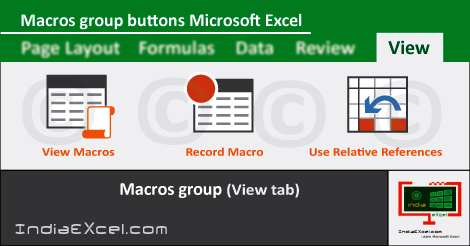
Apart from the Window group, also Workbook Views group, Show group and Zoom group was elaborated in prior posts. Now, in this post we’ll discuss and know about on Macros-group. The View Macros button, Record Macros tool and Use Relative References button are part of Macros group.
Macros group tools of View tab Excel 2016 – continued
The Macros are the steps which’re recorded by the Excel program which users performs in a worksheet. Also, the Macros help users to save lots of time by repeating the tasks speedily. Especially, the Recorded macros could be replayed again and again by assigning a certain shortcut to it. The Macros tool is accompanied by Drop down Menu list.
Firstly, the View Macros button helps to see a list of already created macros by users. The users can choose select which Macro to work with from the list of Macros. Secondly, the Record Macro tool commands lets users to record a new macro.
Lastly, the Use Relative References button helps recording macros; with actions relative to the initial selected cell in worksheet. So that was all about the Macros group buttons tools of View tab ribbon in Microsoft Excel.
After this post, in the next, we’ll discuss the groups of the Developer tab. But, before we do so, we’ve to unlock or make the Developer tab display on the ribbon in Microsoft Excel. Significantly, the buttons of the Developer tab are especially for the developers. For instance, we can say that, the people who write code of the programs are Developers.
Macros group tools of View tab MS Excel 2016
- Macros
- View Macros
- Record Macro
- Use Relative References
See Next Post: Code group buttons commands Developer tab Microsoft Excel 2016
Author:SPiyush
Leave a Reply Cancel reply
STAY UPDATED
RECENT POSTS
File tab Backstage View buttons introduction Microsoft Excel 2016
File tab Backstage View tools MS Excel 2016 In this post,...
Add numbers addition Microsoft Excel 2016 (adding in excel)
How to Add numbers (adding numeric) MS Excel See Previous...
Using Format Painter tool button Microsoft Excel 2016
How to use Format Painter button MS Excel See Previous...
Clipboard group Cut Copy and Paste Microsoft Excel 2016
Cut Copy Paste Clipboard group MS Excel 2016 See Previous...
Description of Font group buttons tools MS Excel 2016
Overview of Font group buttons Excel 2016 See Previous Post: Clipboard...
Alignment group tools buttons Microsoft Excel 2016
Commands of Alignment group Excel 2016 See Previous Post: Font group...
Number group buttons tools Formats Microsoft Excel
Number group tools commands Excel 2016 See Previous Post: Alignment Group...
Styles group buttons Home tab Microsoft Excel 2016

Styles group tools Microsoft Excel 2016 See Previous Post: Number group buttons commands...
Cells group tools description Home tab MS Excel 2016
Cells group buttons overview Microsoft Excel See Previous Post: Styles group...
Editing group buttons Home tab Microsoft Excel 2016

Editing group commands Microsoft Excel See Previous Post: Cells group buttons...
Clipboard, Font, Alignment, Number, Styles, Cells, Editing groups Microsoft Excel
Home tab groups buttons Microsoft Excel 2016 See Previous Post: Editing...
Tables group buttons Insert Tab ribbon Microsoft Excel
Insert Tab tools of Tables group Excel 2016 See Previous...
Illustrations group buttons of Insert Tab Excel 2016
Illustrations group tools Microsoft Excel 2016 See Previous Post: Tables group buttons...
File tab Backstage View buttons introduction Microsoft Excel 2016
File tab Backstage View tools MS Excel 2016 In this post,...
Add numbers addition Microsoft Excel 2016 (adding in excel)
How to Add numbers (adding numeric) MS Excel See Previous...
Using Format Painter tool button Microsoft Excel 2016
How to use Format Painter button MS Excel See Previous...
Clipboard group Cut Copy and Paste Microsoft Excel 2016
Cut Copy Paste Clipboard group MS Excel 2016 See Previous...
Description of Font group buttons tools MS Excel 2016
Overview of Font group buttons Excel 2016 See Previous Post: Clipboard...
Alignment group tools buttons Microsoft Excel 2016
Commands of Alignment group Excel 2016 See Previous Post: Font group...
Number group buttons tools Formats Microsoft Excel
Number group tools commands Excel 2016 See Previous Post: Alignment Group...
Styles group buttons Home tab Microsoft Excel 2016

Styles group tools Microsoft Excel 2016 See Previous Post: Number group buttons commands...
Cells group tools description Home tab MS Excel 2016
Cells group buttons overview Microsoft Excel See Previous Post: Styles group...
Editing group buttons Home tab Microsoft Excel 2016

Editing group commands Microsoft Excel See Previous Post: Cells group buttons...
Clipboard, Font, Alignment, Number, Styles, Cells, Editing groups Microsoft Excel
Home tab groups buttons Microsoft Excel 2016 See Previous Post: Editing...

Tables group buttons Insert Tab ribbon Microsoft Excel
Insert Tab tools of Tables group Excel 2016 See Previous...
Illustrations group buttons of Insert Tab Excel 2016
Illustrations group tools Microsoft Excel 2016 See Previous Post: Tables group buttons...










