
Microsoft Excel Posts & Guides
Arrange group tools of Page Layout tab Microsoft Excel
- August 27, 2016
- Posted by: SPiyush
- Category: Microsoft Excel Groups
Arrange group buttons of Page Layout MS Excel
See Previous Post: Scale to Fit group Sheet Options group buttons MS Excel 2016
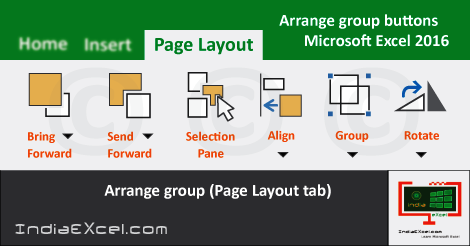
Notably, the last final group is the Arrange group. So, the Page Layout tab ribbon has this group. Also, the location of this group is, moving from the left to right direction. Then first, the from the right direction. Significantly, this group contains six buttons tools, out of which five are accompanied by tiny drop down menus.
Firstly, are the Bring Forward, Send Backward and the Selection Pane buttons etc; of the Arrange-group. In addition the buttons are the Align, the Group and the Rotate. Basically, the Arrange group relates in management and placement of objects in Excel sheets documents.
Also, these buttons are helpful for Shapes. And, these shapes can also be understand as Objects in Microsoft Excel. Especially, the Group and the Rotate buttons, in the New Excel Blank Workbook have been disabled by default.
So, the Bring Forward tool button brings the object forward, one level up in front of all other objects. Similarly, Send Backward button tool sends the object forward one level down, behind of all other objects.
Further, the Send Backward button tool lets Excel users to see list of all the objects. Moreover, the Align button changes the placement of selected objects in Excel document.
Lastly, the Group tool helps to join objects together for formatting and movement as they were a single object. While, the Rotate button tool supports to flip or rotate selected objects in MS Excel sheet documents.
Arrange group commands of Page Layout MS Excel 2016
- Arrange
- Bring Forward
- Bring to Front
- Send Backward
- Send to Back
- Selection Pane
- Align
- Align-Left
- Align-Center
- Align-Right
- Align-Top
- Align-Middle
- Align-Bottom
- Distribute-Horizontally
- Distribute-Vertically
- Snap to Grid
- Snap to Shape
- View Gridlines
- Group
- Regroup
- Ungroup
- Rotate
- Rotate-Right 90°
- Rotate-Left 90°
- Flip Vertical
- Flip Horizontal
- More Rotation Options
- Bring Forward
See Next Post: Function Library group Formulas tab ribbon Microsoft Excel 2016
Author:SPiyush
Leave a Reply Cancel reply
STAY UPDATED
RECENT POSTS
File tab Backstage View buttons introduction Microsoft Excel 2016

File tab Backstage View tools MS Excel 2016 In this post,...
Add numbers addition Microsoft Excel 2016 (adding in excel)

How to Add numbers (adding numeric) MS Excel See Previous...
Using Format Painter tool button Microsoft Excel 2016

How to use Format Painter button MS Excel See Previous...
Clipboard group Cut Copy and Paste Microsoft Excel 2016

Cut Copy Paste Clipboard group MS Excel 2016 See Previous...
Description of Font group buttons tools MS Excel 2016
Overview of Font group buttons Excel 2016 See Previous Post: Clipboard...
Alignment group tools buttons Microsoft Excel 2016

Commands of Alignment group Excel 2016 See Previous Post: Font group...
Number group buttons tools Formats Microsoft Excel
Number group tools commands Excel 2016 See Previous Post: Alignment Group...
Styles group buttons Home tab Microsoft Excel 2016
Styles group tools Microsoft Excel 2016 See Previous Post: Number group buttons commands...
Cells group tools description Home tab MS Excel 2016
Cells group buttons overview Microsoft Excel See Previous Post: Styles group...
Editing group buttons Home tab Microsoft Excel 2016
Editing group commands Microsoft Excel See Previous Post: Cells group buttons...
Clipboard, Font, Alignment, Number, Styles, Cells, Editing groups Microsoft Excel
Home tab groups buttons Microsoft Excel 2016 See Previous Post: Editing...
Tables group buttons Insert Tab ribbon Microsoft Excel
Insert Tab tools of Tables group Excel 2016 See Previous...
Illustrations group buttons of Insert Tab Excel 2016
Illustrations group tools Microsoft Excel 2016 See Previous Post: Tables group buttons...
File tab Backstage View buttons introduction Microsoft Excel 2016
File tab Backstage View tools MS Excel 2016 In this post,...
Add numbers addition Microsoft Excel 2016 (adding in excel)
How to Add numbers (adding numeric) MS Excel See Previous...
Using Format Painter tool button Microsoft Excel 2016
How to use Format Painter button MS Excel See Previous...
Clipboard group Cut Copy and Paste Microsoft Excel 2016
Cut Copy Paste Clipboard group MS Excel 2016 See Previous...
Description of Font group buttons tools MS Excel 2016
Overview of Font group buttons Excel 2016 See Previous Post: Clipboard...
Alignment group tools buttons Microsoft Excel 2016
Commands of Alignment group Excel 2016 See Previous Post: Font group...
Number group buttons tools Formats Microsoft Excel
Number group tools commands Excel 2016 See Previous Post: Alignment Group...
Styles group buttons Home tab Microsoft Excel 2016
Styles group tools Microsoft Excel 2016 See Previous Post: Number group buttons commands...
Cells group tools description Home tab MS Excel 2016
Cells group buttons overview Microsoft Excel See Previous Post: Styles group...
Editing group buttons Home tab Microsoft Excel 2016
Editing group commands Microsoft Excel See Previous Post: Cells group buttons...
Clipboard, Font, Alignment, Number, Styles, Cells, Editing groups Microsoft Excel
Home tab groups buttons Microsoft Excel 2016 See Previous Post: Editing...
Tables group buttons Insert Tab ribbon Microsoft Excel
Insert Tab tools of Tables group Excel 2016 See Previous...
Illustrations group buttons of Insert Tab Excel 2016
Illustrations group tools Microsoft Excel 2016 See Previous Post: Tables group buttons...










