
Microsoft Excel Posts & Guides
Review tab groups buttons shortcuts Microsoft Excel 2016
- September 20, 2016
- Posted by: SPiyush
- Category: Microsoft Excel Shortcuts
Review tab groups buttons shortcuts MS Excel
See Previous Post: Data tab groups tools buttons shortcuts Microsoft Excel 2016
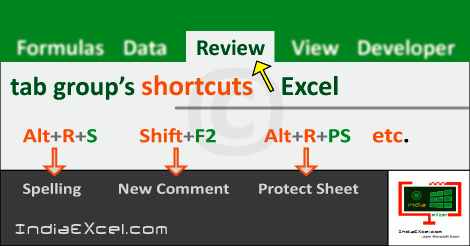
In the table mentioned below, contains the Review tab groups buttons shortcuts list. The Shortcuts helps users to save work energy and time in Excel. These shortcuts are part of the Review tab ribbon group’s in MS Excel.
So, the groups of the Review tab are the Proofing group, the Accessibility group and the Insights group. Also, the other groups are the Language group, the Comments group and the Changes group.
Some of the buttons of these groups’re the Spelling button, the Thesaurus button and the Smart Lookup button etc. Additionally, the Translate button, the New Comment button, and the Protect Sheet button are some of the other buttons.
In the first place, the Review tab group’s shortcuts applies Comments, Spelling checks, Protection etc. The “Alt” key is the starting key which shall be pressed, thereafter other keys for shortcuts. Similarly, the “Ctrl” key shortcuts with the other keys, accomplish the tasks rapidly in excel.
Review tab group’s shortcuts Microsoft Excel
| Alt Key shortcuts | Description |
| Alt+R+S or F7 | Spelling button |
| Alt+R+E | Thesaurus tool |
| Alt+R+RS | Smart Lookup button |
| Alt+R+L | Translate button |
| Alt+R+C or Shift+F2 | New Comment (Insert a Comment) |
| Alt+R+D | Delete Comment button |
| Alt+R+V | Previous Comment tool |
| Alt+R+N | Next Comment button |
| Alt+R+H | Show/Hide Comment |
| Alt+R+A | Show All Comments |
| Alt+R+I | Show Ink button |
| Alt+R+PS | Protect Sheet tool |
| Alt+R+PW | Protect Workbook button |
| Alt+R+W | Share Workbook tool |
| Alt+R+O | Protect and Share Workbook |
| Alt+R+U | Allow Users to Edit Ranges tool |
| Alt+R+G | Track Changes button |
Especially, the button & tool words above in the table offer similar meaning. Various key combinations with the “Alt” key as shortcuts provides quick completion of works. Additionally, the “Ctrl” key in Excel are also an alternative to the “Alt” key shortcut keys.
See Next Post: View tab groups buttons tools shortcuts Microsoft Excel 2016
Author:SPiyush
Leave a Reply Cancel reply
STAY UPDATED
RECENT POSTS
File tab Backstage View buttons introduction Microsoft Excel 2016
File tab Backstage View tools MS Excel 2016 In this post,...
Add numbers addition Microsoft Excel 2016 (adding in excel)
How to Add numbers (adding numeric) MS Excel See Previous...
Using Format Painter tool button Microsoft Excel 2016
How to use Format Painter button MS Excel See Previous...
Clipboard group Cut Copy and Paste Microsoft Excel 2016
Cut Copy Paste Clipboard group MS Excel 2016 See Previous...
Description of Font group buttons tools MS Excel 2016
Overview of Font group buttons Excel 2016 See Previous Post: Clipboard...
Alignment group tools buttons Microsoft Excel 2016

Commands of Alignment group Excel 2016 See Previous Post: Font group...
Number group buttons tools Formats Microsoft Excel
Number group tools commands Excel 2016 See Previous Post: Alignment Group...
Styles group buttons Home tab Microsoft Excel 2016

Styles group tools Microsoft Excel 2016 See Previous Post: Number group buttons commands...

Cells group tools description Home tab MS Excel 2016
Cells group buttons overview Microsoft Excel See Previous Post: Styles group...
Editing group buttons Home tab Microsoft Excel 2016

Editing group commands Microsoft Excel See Previous Post: Cells group buttons...
Clipboard, Font, Alignment, Number, Styles, Cells, Editing groups Microsoft Excel
Home tab groups buttons Microsoft Excel 2016 See Previous Post: Editing...
Tables group buttons Insert Tab ribbon Microsoft Excel
Insert Tab tools of Tables group Excel 2016 See Previous...
Illustrations group buttons of Insert Tab Excel 2016
Illustrations group tools Microsoft Excel 2016 See Previous Post: Tables group buttons...
File tab Backstage View buttons introduction Microsoft Excel 2016
File tab Backstage View tools MS Excel 2016 In this post,...
Add numbers addition Microsoft Excel 2016 (adding in excel)
How to Add numbers (adding numeric) MS Excel See Previous...
Using Format Painter tool button Microsoft Excel 2016
How to use Format Painter button MS Excel See Previous...
Clipboard group Cut Copy and Paste Microsoft Excel 2016
Cut Copy Paste Clipboard group MS Excel 2016 See Previous...
Description of Font group buttons tools MS Excel 2016
Overview of Font group buttons Excel 2016 See Previous Post: Clipboard...
Alignment group tools buttons Microsoft Excel 2016
Commands of Alignment group Excel 2016 See Previous Post: Font group...
Number group buttons tools Formats Microsoft Excel
Number group tools commands Excel 2016 See Previous Post: Alignment Group...
Styles group buttons Home tab Microsoft Excel 2016
Styles group tools Microsoft Excel 2016 See Previous Post: Number group buttons commands...
Cells group tools description Home tab MS Excel 2016
Cells group buttons overview Microsoft Excel See Previous Post: Styles group...
Editing group buttons Home tab Microsoft Excel 2016
Editing group commands Microsoft Excel See Previous Post: Cells group buttons...
Clipboard, Font, Alignment, Number, Styles, Cells, Editing groups Microsoft Excel
Home tab groups buttons Microsoft Excel 2016 See Previous Post: Editing...
Tables group buttons Insert Tab ribbon Microsoft Excel
Insert Tab tools of Tables group Excel 2016 See Previous...
Illustrations group buttons of Insert Tab Excel 2016
Illustrations group tools Microsoft Excel 2016 See Previous Post: Tables group buttons...











