
Microsoft Excel Posts & Guides
Delete buttons description of Cells group Excel
- October 19, 2016
- Posted by: SPiyush
- Category: Microsoft Excel Buttons
Delete buttons description Cells group MS Excel
See Previous Post: Insert buttons tools Cells group Microsoft Excel 2016
Previously, in the post, we’ve discussed about on the Delete buttons. Now, we’ll next explain deep about the Delete buttons. Also, these buttons are part of the Cells group of the Home tab. And, the key role of these buttons, as the topic of this post says, is to delete. Whether, it is the Row or the Column or the Cells in worksheet.
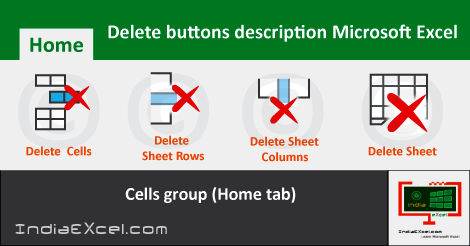
Almost similarly like the Insert button, in sum, the Delete button has four buttons. So, they’re the Delete Cells and the Delete Sheet Rows buttons etc. Also, the rest are the Delete Sheet Columns and the Delete Sheet buttons. Significantly, already we know that, the buttons have their own Shortcut Keys.
Delete buttons of Cells group Excel 2016 – continued
Firstly, the Delete Cells button helps to delete new cells, rows, and the columns. And, these’re deleted from a table or in the worksheet. Above all, the selected Rows gets deleted by first selecting them. The Shortcut Key for this buttons is the “Ctrl+-” in MS Excel.
Secondly, the Delete Sheet Rows button deletes new rows from the sheet. Most noteworthy, to delete more than a single row at once, first the rows shall be selected. For example, if we need to delete two rows, then we must select two rows.
Thirdly, the Delete Sheet Columns buttons helps to delete new columns in the sheet. And, to delete multiple columns at once, more than one column should be selected. Especially, the “Ctrl+-” keys deletes the new Columns and the Rows.
Delete tools of Cells group Microsoft Excel 2016
Lastly, the Delete Sheet buttons deletes the currently selected sheet from the bottom. The sheet is deleted automatically from the sheet, that is already present in Microsoft Excel.
So, the Shortcut Key of this button is “Alt+H+D+S“. Most of all, the deleting of the Rows, the Columns or the Cells’re most frequently done; in comparison to the insertion of these, while working.
And, for deleting multiple sheets at once, hold and press the Shift key and then click the numbers sheets. By this way, more than single sheets’re selected and then deleted easily.
Also, using the Ctrl key helps users to select multiple sheets; from in between, by clicking individually on the sheets for deleting.
See Next Post: Multiple ways use Autosum buttons functions Microsoft Excel 2016
Author:SPiyush
Leave a Reply Cancel reply
STAY UPDATED
RECENT POSTS
File tab Backstage View buttons introduction Microsoft Excel
File tab Backstage View tools Microsoft Excel Complete Guide to...
Add numbers addition Microsoft Excel (adding in excel)
How to Add numbers (adding numeric) Microsoft Excel See Previous...
Using Format Painter button Microsoft Excel
Format Painter tool in Microsoft Excel See Previous Post: Add numbers...
Clipboard group Cut Copy and Paste Microsoft Excel
Cut Copy Paste Clipboard group MS Excel 2016 See Previous...
Description of Font group buttons tools Microsoft Excel
Overview of Font group buttons Excel 2016 See Previous Post: Clipboard...
Alignment group tools buttons Microsoft Excel
Commands of Alignment group Excel 2016 See Previous Post: Font group...
Number group buttons tools Formats Microsoft Excel
Number group tools commands Excel 2016 See Previous Post: Alignment Group...
Styles group buttons of Home tab Microsoft Excel
Styles group tools Microsoft Excel 2016 See Previous Post: Number group buttons commands...
Cells group tools description Home tab Microsoft Excel
Cells group buttons overview Microsoft Excel See Previous Post: Styles group...
Editing group buttons Home tab Microsoft Excel
Editing group commands Microsoft Excel See Previous Post: Cells group buttons...
Clipboard, Font, Alignment, Number, Styles, Cells, Editing groups Microsoft Excel
Home tab groups buttons Microsoft Excel 2016 See Previous Post: Editing...

Tables group buttons Insert Tab ribbon Microsoft Excel
Insert Tab tools of Tables group Excel 2016 See Previous...
Illustrations group buttons of Insert Tab Microsoft Excel
Illustrations group tools Microsoft Excel 2016 See Previous Post: Tables group buttons...
File tab Backstage View buttons introduction Microsoft Excel
File tab Backstage View tools Microsoft Excel Complete Guide to...
Add numbers addition Microsoft Excel (adding in excel)
How to Add numbers (adding numeric) Microsoft Excel See Previous...
Using Format Painter button Microsoft Excel
Format Painter tool in Microsoft Excel See Previous Post: Add numbers...
Clipboard group Cut Copy and Paste Microsoft Excel
Cut Copy Paste Clipboard group MS Excel 2016 See Previous...
Description of Font group buttons tools Microsoft Excel
Overview of Font group buttons Excel 2016 See Previous Post: Clipboard...
Alignment group tools buttons Microsoft Excel
Commands of Alignment group Excel 2016 See Previous Post: Font group...
Number group buttons tools Formats Microsoft Excel
Number group tools commands Excel 2016 See Previous Post: Alignment Group...
Styles group buttons of Home tab Microsoft Excel
Styles group tools Microsoft Excel 2016 See Previous Post: Number group buttons commands...
Cells group tools description Home tab Microsoft Excel
Cells group buttons overview Microsoft Excel See Previous Post: Styles group...
Editing group buttons Home tab Microsoft Excel
Editing group commands Microsoft Excel See Previous Post: Cells group buttons...
Clipboard, Font, Alignment, Number, Styles, Cells, Editing groups Microsoft Excel
Home tab groups buttons Microsoft Excel 2016 See Previous Post: Editing...

Tables group buttons Insert Tab ribbon Microsoft Excel
Insert Tab tools of Tables group Excel 2016 See Previous...
Illustrations group buttons of Insert Tab Microsoft Excel
Illustrations group tools Microsoft Excel 2016 See Previous Post: Tables group buttons...













