
Microsoft Excel Posts & Guides
Formula Auditing group buttons of Formulas tab Microsoft Excel
- August 30, 2016
- Posted by: SPiyush
- Category: Microsoft Excel Groups
Formula Auditing group tools MS Excel 2016
See Previous Post: Defined Names group buttons Formulas tab Microsoft Excel 2016
We’ve discussed about on the Defined Names group, in the previous post. And before that, we got to know about on the buttons of the Function Library group. So, now in this post, we’ll have an overview of the tools of the Formula Auditing group. The Formulas tab has this group.
The inspection, survey, or the review of the tasks done is known as Auditing. So, this group has the collection of various such tools. Because these are necessary for the checking purposes. The review of the formulas, errors and their evaluation are achieved by the buttons of this group.
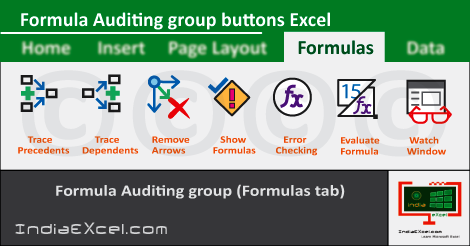
In this first place, the Trace Precedents, Trace Dependents and the Remove Arrows etc; tools are part of this group. Also, are the Show Formulas and the Error Checking buttons etc. Additionally, the buttons are the Evaluate Formula and the Watch Window. The Remove Arrows and the Error Checking tools have the Drop down buttons.
Formula Auditing group buttons Formulas tab Excel
Firstly, the Trace Precedents tool shows the arrows indicating which cells affect the value of the selected cell. Secondly, the Trace Dependents button shows the arrows, indicating which cells have been affected by the value of selected cell.
Thirdly, the already drawn arrows by the Trace Precedents; and the Trace Dependents buttons is removed by the Remove Arrows button. Also, this button has the Remove Precedent Arrows and the Remove Dependent Arrows buttons.
Fourthly, the formula in cells can be displayed using the Show Formulas tool button. The Error Checking button helps to check for the common errors in formulas while writing them. Even more, the Trace Error and the Circular References buttons are part of the Error Checking drop down button.
The Evaluate Formula button is helpful in debugging the complicated formulas in steps (in parts). Lastly, the Watch Window button adds the cells to the Watch Window list. Hence, helping users to keep an eye on their values, as other parts of the sheet gets update along time.
Formula Auditing group commands MS Excel
- Formula Auditing
- Trace Precedents
- Trace Dependents
- Remove Arrows
- Remove-Precedent Arrows
- Remove-Dependent Arrows
- Show Formulas
- Error Checking
- Trace Error
- Circular References
- Evaluate Formula
- Watch Window
See Next Post: Calculation group buttons Formulas tab Microsoft Excel 2016
Author:SPiyush
Leave a Reply Cancel reply
STAY UPDATED
RECENT POSTS
File tab Backstage View buttons introduction Microsoft Excel
File tab Backstage View tools Microsoft Excel Complete Guide to...
Add numbers addition Microsoft Excel (adding in excel)
How to Add numbers (adding numeric) Microsoft Excel See Previous...
Using Format Painter button Microsoft Excel
Format Painter tool in Microsoft Excel See Previous Post: Add numbers...
Clipboard group Cut Copy and Paste Microsoft Excel
Cut Copy Paste Clipboard group MS Excel 2016 See Previous...
Description of Font group buttons tools Microsoft Excel
Overview of Font group buttons Excel 2016 See Previous Post: Clipboard...
Alignment group tools buttons Microsoft Excel
Commands of Alignment group Excel 2016 See Previous Post: Font group...
Number group buttons tools Formats Microsoft Excel
Number group tools commands Excel 2016 See Previous Post: Alignment Group...
Styles group buttons of Home tab Microsoft Excel
Styles group tools Microsoft Excel 2016 See Previous Post: Number group buttons commands...

Cells group tools description Home tab Microsoft Excel
Cells group buttons overview Microsoft Excel See Previous Post: Styles group...
Editing group buttons Home tab Microsoft Excel
Editing group commands Microsoft Excel See Previous Post: Cells group buttons...
Clipboard, Font, Alignment, Number, Styles, Cells, Editing groups Microsoft Excel
Home tab groups buttons Microsoft Excel 2016 See Previous Post: Editing...

Tables group buttons Insert Tab ribbon Microsoft Excel
Insert Tab tools of Tables group Excel 2016 See Previous...
Illustrations group buttons of Insert Tab Microsoft Excel
Illustrations group tools Microsoft Excel 2016 See Previous Post: Tables group buttons...

File tab Backstage View buttons introduction Microsoft Excel
File tab Backstage View tools Microsoft Excel Complete Guide to...
Add numbers addition Microsoft Excel (adding in excel)
How to Add numbers (adding numeric) Microsoft Excel See Previous...
Using Format Painter button Microsoft Excel
Format Painter tool in Microsoft Excel See Previous Post: Add numbers...
Clipboard group Cut Copy and Paste Microsoft Excel
Cut Copy Paste Clipboard group MS Excel 2016 See Previous...
Description of Font group buttons tools Microsoft Excel
Overview of Font group buttons Excel 2016 See Previous Post: Clipboard...
Alignment group tools buttons Microsoft Excel
Commands of Alignment group Excel 2016 See Previous Post: Font group...
Number group buttons tools Formats Microsoft Excel
Number group tools commands Excel 2016 See Previous Post: Alignment Group...
Styles group buttons of Home tab Microsoft Excel
Styles group tools Microsoft Excel 2016 See Previous Post: Number group buttons commands...
Cells group tools description Home tab Microsoft Excel
Cells group buttons overview Microsoft Excel See Previous Post: Styles group...
Editing group buttons Home tab Microsoft Excel
Editing group commands Microsoft Excel See Previous Post: Cells group buttons...
Clipboard, Font, Alignment, Number, Styles, Cells, Editing groups Microsoft Excel
Home tab groups buttons Microsoft Excel 2016 See Previous Post: Editing...
Tables group buttons Insert Tab ribbon Microsoft Excel
Insert Tab tools of Tables group Excel 2016 See Previous...
Illustrations group buttons of Insert Tab Microsoft Excel
Illustrations group tools Microsoft Excel 2016 See Previous Post: Tables group buttons...












