
Microsoft Excel Posts & Guides
XML group buttons of Developer tab MS Excel 2016
- September 15, 2016
- Posted by: SPiyush
- Category: Microsoft Excel Groups
XML group tools of Developer tab Excel 2016
See Previous Post: Controls group button tools Developer tab Microsoft Excel 2016
Finally, the XML group is the last group of the Developer tab. In the prior posts, the first three groups of this tab have been discussed already. They’re the Code group, the Add-ins group and the Controls group. So, in the last post, we knew about the Control group’s buttons.
Also, the buttons like the Macros button and the View Code button etc; have been explained. In addition, the Excel Add-ins and the Use Relative References button. Now in this post, the XML group buttons will be part of the elaboration. The XML-group contains six buttons commands within.
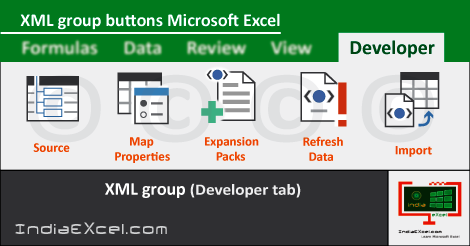
The Source, Map Properties, Expansion Packs, Refresh Data, Import and Export are the six tools of the XML-group. Especially, the Map Properties, the Refresh Data and the Export buttons of the XML group’re disabled by default.
XML group tools Developer tab Microsoft Excel – continued
Firstly, the Source button lets users to manage XML Maps in a workbook by opening the XML Source task pane. Secondly, the Map Properties tool helps users to see or modify properties of XML maps. Thirdly, the Expansion Packs button lets users to attach a new expansion pack.
Additionally, management of XML expansion packs attached to documents, using Expansion Packs tool is also done. Furthermore, the Refresh Data tool button refreshes the XML data in workbook. Lastly, the Import button & Export button helps Excel users to import and export XML data file.
By this post, we’ve so far discussed about all the tab in Microsoft Excel. So, there are total Eight tabs. And, out of the eight tabs, the Developer tab has been kept hidden by default. Also, the buttons of these groups has been explained briefly.
XML group tools of Developer tab Excel 2016
- XML
- Source
- Map Properties
- Expansion Packs
- Refresh Data
- Import
- Export
See Next Post: Home tab groups button tools shortcuts Microsoft Excel 2016
Author:SPiyush
Leave a Reply Cancel reply
STAY UPDATED
RECENT POSTS
File tab Backstage View buttons introduction Microsoft Excel 2016
File tab Backstage View tools MS Excel 2016 In this post,...
Add numbers addition Microsoft Excel 2016 (adding in excel)
How to Add numbers (adding numeric) MS Excel See Previous...
Using Format Painter tool button Microsoft Excel 2016
How to use Format Painter button MS Excel See Previous...
Clipboard group Cut Copy and Paste Microsoft Excel 2016
Cut Copy Paste Clipboard group MS Excel 2016 See Previous...
Description of Font group buttons tools MS Excel 2016
Overview of Font group buttons Excel 2016 See Previous Post: Clipboard...
Alignment group tools buttons Microsoft Excel 2016

Commands of Alignment group Excel 2016 See Previous Post: Font group...
Number group buttons tools Formats Microsoft Excel
Number group tools commands Excel 2016 See Previous Post: Alignment Group...
Styles group buttons Home tab Microsoft Excel 2016

Styles group tools Microsoft Excel 2016 See Previous Post: Number group buttons commands...

Cells group tools description Home tab MS Excel 2016
Cells group buttons overview Microsoft Excel See Previous Post: Styles group...
Editing group buttons Home tab Microsoft Excel 2016

Editing group commands Microsoft Excel See Previous Post: Cells group buttons...
Clipboard, Font, Alignment, Number, Styles, Cells, Editing groups Microsoft Excel
Home tab groups buttons Microsoft Excel 2016 See Previous Post: Editing...
Tables group buttons Insert Tab ribbon Microsoft Excel
Insert Tab tools of Tables group Excel 2016 See Previous...
Illustrations group buttons of Insert Tab Excel 2016
Illustrations group tools Microsoft Excel 2016 See Previous Post: Tables group buttons...
File tab Backstage View buttons introduction Microsoft Excel 2016
File tab Backstage View tools MS Excel 2016 In this post,...
Add numbers addition Microsoft Excel 2016 (adding in excel)
How to Add numbers (adding numeric) MS Excel See Previous...
Using Format Painter tool button Microsoft Excel 2016
How to use Format Painter button MS Excel See Previous...
Clipboard group Cut Copy and Paste Microsoft Excel 2016
Cut Copy Paste Clipboard group MS Excel 2016 See Previous...
Description of Font group buttons tools MS Excel 2016
Overview of Font group buttons Excel 2016 See Previous Post: Clipboard...
Alignment group tools buttons Microsoft Excel 2016
Commands of Alignment group Excel 2016 See Previous Post: Font group...
Number group buttons tools Formats Microsoft Excel
Number group tools commands Excel 2016 See Previous Post: Alignment Group...
Styles group buttons Home tab Microsoft Excel 2016
Styles group tools Microsoft Excel 2016 See Previous Post: Number group buttons commands...
Cells group tools description Home tab MS Excel 2016
Cells group buttons overview Microsoft Excel See Previous Post: Styles group...
Editing group buttons Home tab Microsoft Excel 2016
Editing group commands Microsoft Excel See Previous Post: Cells group buttons...
Clipboard, Font, Alignment, Number, Styles, Cells, Editing groups Microsoft Excel
Home tab groups buttons Microsoft Excel 2016 See Previous Post: Editing...
Tables group buttons Insert Tab ribbon Microsoft Excel
Insert Tab tools of Tables group Excel 2016 See Previous...
Illustrations group buttons of Insert Tab Excel 2016
Illustrations group tools Microsoft Excel 2016 See Previous Post: Tables group buttons...











