
Microsoft Excel Posts & Guides
Clipboard, Font, Alignment, Number, Styles, Cells, Editing groups Microsoft Excel
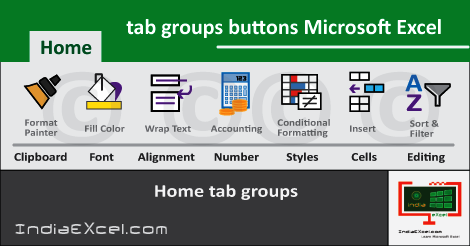
Home tab groups buttons Microsoft Excel 2016
See Previous Post: Editing group buttons tools Home tab Microsoft Excel 2016
Especially, in this post, we’ll discuss about on the Home tab groups. These are the Clipboard group, the Font group etc; and so on. Further are the the Alignment group, the Number group.
Also, are the Styles group and the Cells group. Particularly, the initial most group is the Clipboard group. While, the Editing group is the last one of Home Tab ribbon in Excel.
Home tab groups tools MS Excel 2016 – continued
So, the Font, the Alignment, the Number, the Styles and the Cells groups; all lie in between the Clipboard and the Editing group. Significantly, we’ve mentioned all these groups individually in prior previous posts.
Hence, by this way in a single post we’ll have summarized details of these groups. And, we’ll discuss about the Insert, the Page, the Layout and the Formulas etc; in other further posts.
In addition, are the Data, the Review and the View tabs too. Lastly, the other groups, functions and tools are also part of these tab ribbons. Hence, it becomes quite important to know about them.
Home tab groups commands Excel 2016
- Firstly, Clipboard Group
- Cut
- Copy
- Copy as Picture
- Paste
- Keep Source Formatting
- Match Destination Formatting
- Paste Special
- Format Painter
- Secondly, Font-Group
- Font
- Font-Size
- Bold
- Italic
- Underline
- Double Underline
- Borders
- Bottom Border
- Top Border
- Left Border
- Right Border
- No Border
- All Borders
- Outside Borders
- Thick Outside Borders
- Bottom Double Border
- Thick-Bottom Border
- Top-and-Bottom-Border
- Top-and-Thick-Bottom-Border
- Top-and-Double Bottom Border
- Draw Borders
- Draw-Border
- Draw-Border-Grid
- Erase Border
- Line Color
- Line Style
- More Borders
- Increase Font-Size
- Decrease Font-Size
- Fill Color
- Theme Colors
- Standard Colors
- No Fill
- More Colors
- Font-Color
- Automatic
- Theme Colors
- Standard Colors
- More Colors
- Thirdly, Alignment Group
- Top Align
- Middle Align
- Bottom Align
- Align Left
- Center
- Align Right
- Orientation
- Angle Counterclockwise
- Angle Clockwise
- Vertical Text
- Rotate Text Up
- Rotate Text Down
- Format Cell Alignment
- Decrease Indent
- Increase Indent
- Wrap Text
- Merge & Center
- Merge-Across
- Merge-Cells
- Unmerge Cells
Home tab groups tools Microsoft Excel 2016 (continued)
- Fourthly, Number Group
- General
- Number
- Currency
- Accounting
- Short Date
- Long Date
- Time
- Percentage
- Fraction
- Scientific
- More Number Formats
- Accounting Number Format
- Percent Style
- Comma Style
- Increase Decimal
- Decrease Decimal
- Further, Styles Group
- Conditional Formatting
- Highlight Cell Rules
- Top Bottom Rules
- Data Bars
- Color Scales
- Icon Sets
- New Rule
- Clear Rules
- Manage Rules
- Format as Table
- Light
- Medium
- Dark
- New Table Style
- New Pivot Table Style
- Cell Styles
- Good, Bad and Neutral
- Data and Model
- Titles and Headings
- Themed Cell Styles
- Number Format
- New Cell Style
- Merge Styles
- Conditional Formatting
- Finally, Cells Group
- Insert
- Insert-Cells
- Insert-Sheet-Rows
- Insert-Sheet Columns
- Insert-Sheet
- Delete
- Delete-Cells
- Delete-Sheet-Rows
- Delete-Sheet-Columns
- Delete-Sheet
- Format
- Cell Size
- Row Height
- AutoFit Row Height
- Column Width
- AutoFit Column Width
- Default Width
- Visibility
- Hide & Unhide
- Organize Sheets
- Rename Sheet
- Move or Copy Sheet
- Tab Color
- Protection
- Protect Sheet
- Lock Cell
- Format Cells
- Insert
- Lastly, Editing Group
- Autosum
- Sum
- Average
- Count Numbers
- Max
- Min
- More Functions
- Fill
- Down
- Right
- Up
- Left
- Across Worksheets
- Series
- Justify
- Flash Fill
- Clear
- Clear-All
- Clear-Formats
- Clear-Contents
- Clear-Comments
- Clear-Hyperlinks
- Remove Hyperlinks
- Sort & Filter
- Sort-A to Z
- Sort-Z to A
- Custom Sort
- Filter
- Clear
- Reapply
- Find & Select
- Find
- Replace
- Go To
- Go To Special
- Formulas
- Comments
- Conditional Formatting
- Constants
- Data Validation
- Select Objects
- Selection Pane
- Autosum
Specifically, the huge list above, is a detailed description of buttons from all the groups of Home tab. Moreover, the Flash Fill, Data Validation, Autosum and Format Painter buttons are the most important ones.
Collectively, we require the rest of the other tools at their respective places. On the whole, the first tab is quite significant and vital, in the first place. Lastly, the other tabs play their chief roles in excel tasks, in the second place.
See Next Post: Tables group buttons Insert Tab ribbon Microsoft Excel 2016
Terms related to this Post:
Clipboard Group Excel Mac
Home Tab in Excel
Home-Tab in Excel 2010
Clipboard-Group Excel
Clipboard Group Excel 2010
Font-Group Excel
Font Group in-Excel 2010
Font-Group Commands in Excel
Alignment-Group Excel
Alignment Group-Commands
Alignment-Group in Excel 2010
Number-Group in MS Excel
Number Group Excel 2010
Styles-Group Excel
Styles Group-Excel 2010
Cells-Group Excel
Cells Group in Excel 2010
Editing Group Excel
Editing-Group Excel 2010
















