
Microsoft Excel Posts & Guides
Align buttons of Alignment group Home tab Excel 2016
- October 14, 2016
- Posted by: SPiyush
- Category: Microsoft Excel Buttons
Align buttons of Home tab MS Excel 2016
See Previous Post: Border buttons description Font group Home tab MS Excel 2016
Now, a furthermore explanation about the Align buttons shall be given through this post. So, the Alignment group of the Home tab has Six Align buttons. In total, this group has Eleven buttons including the Six Align buttons. The buttons other than these Six are the Orientation, Decrease Indent, Increase Indent and the Merge & Center.
So, the Six Align buttons are the Top Align, Middle Align and the Bottom Align etc. In addition, are the Align Left, Center-Align and the Align Right buttons etc. Further, is some information that shall be remembered by the users.
First of all, the Text (Alphabets) when typed in a cell, by default shift to the left side cell border. Also, the Special Characters shift left side of the cell border. Secondly, the Numeric (Numbers) when put in a cell, by default shift to the right side border of the cell.
Using Align buttons of Alignment group Excel – continued
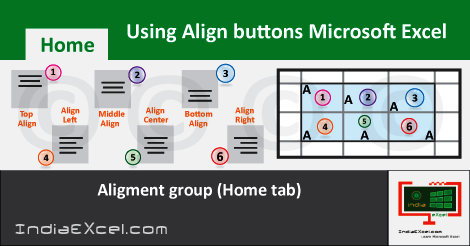
To understand the Align buttons, firstly select three Rows and set the Row Height to approx 50 (66 Pixels). And, then select three Columns and set the the Column Width to 15 (110 Pixels). So, now we have six cells which have Dimensions 50 X 15 of each one of them.
Type the Alphabet “A” in all of the Six cells; starting from the Left Top Cell to the Right Bottom Cell. And, then click the First Left Top Cell and select the Top Align. Next, select the Second Middle Top Cell and click the Middle Align.
Likewise, then click the Right Top Cell and select the Bottom Align. In the same way, select the Align Left, Center-Align and the Align Right for the all the Bottom Cells respectively.
Notably, if we did all the steps correctly; the position of the character “A” shifted to Six locations within a cell. So, now by doing this, we’ve a clear understanding about the Align-buttons; when and where to use them appropriately.
See Next Post: Orientation buttons Alignment group Microsoft Excel 2016
Author:SPiyush
Leave a Reply Cancel reply
STAY UPDATED
RECENT POSTS
File tab Backstage View buttons introduction Microsoft Excel 2016

File tab Backstage View tools MS Excel 2016 In this post,...
Add numbers addition Microsoft Excel 2016 (adding in excel)

How to Add numbers (adding numeric) MS Excel See Previous...
Using Format Painter tool button Microsoft Excel 2016

How to use Format Painter button MS Excel See Previous...
Clipboard group Cut Copy and Paste Microsoft Excel 2016
Cut Copy Paste Clipboard group MS Excel 2016 See Previous...
Description of Font group buttons tools MS Excel 2016
Overview of Font group buttons Excel 2016 See Previous Post: Clipboard...
Alignment group tools buttons Microsoft Excel 2016
Commands of Alignment group Excel 2016 See Previous Post: Font group...
Number group buttons tools Formats Microsoft Excel
Number group tools commands Excel 2016 See Previous Post: Alignment Group...
Styles group buttons Home tab Microsoft Excel 2016
Styles group tools Microsoft Excel 2016 See Previous Post: Number group buttons commands...
Cells group tools description Home tab MS Excel 2016
Cells group buttons overview Microsoft Excel See Previous Post: Styles group...
Editing group buttons Home tab Microsoft Excel 2016
Editing group commands Microsoft Excel See Previous Post: Cells group buttons...
Clipboard, Font, Alignment, Number, Styles, Cells, Editing groups Microsoft Excel
Home tab groups buttons Microsoft Excel 2016 See Previous Post: Editing...
Tables group buttons Insert Tab ribbon Microsoft Excel
Insert Tab tools of Tables group Excel 2016 See Previous...
Illustrations group buttons of Insert Tab Excel 2016
Illustrations group tools Microsoft Excel 2016 See Previous Post: Tables group buttons...
File tab Backstage View buttons introduction Microsoft Excel 2016
File tab Backstage View tools MS Excel 2016 In this post,...
Add numbers addition Microsoft Excel 2016 (adding in excel)
How to Add numbers (adding numeric) MS Excel See Previous...
Using Format Painter tool button Microsoft Excel 2016
How to use Format Painter button MS Excel See Previous...
Clipboard group Cut Copy and Paste Microsoft Excel 2016
Cut Copy Paste Clipboard group MS Excel 2016 See Previous...
Description of Font group buttons tools MS Excel 2016
Overview of Font group buttons Excel 2016 See Previous Post: Clipboard...
Alignment group tools buttons Microsoft Excel 2016
Commands of Alignment group Excel 2016 See Previous Post: Font group...
Number group buttons tools Formats Microsoft Excel
Number group tools commands Excel 2016 See Previous Post: Alignment Group...
Styles group buttons Home tab Microsoft Excel 2016
Styles group tools Microsoft Excel 2016 See Previous Post: Number group buttons commands...
Cells group tools description Home tab MS Excel 2016
Cells group buttons overview Microsoft Excel See Previous Post: Styles group...
Editing group buttons Home tab Microsoft Excel 2016
Editing group commands Microsoft Excel See Previous Post: Cells group buttons...
Clipboard, Font, Alignment, Number, Styles, Cells, Editing groups Microsoft Excel
Home tab groups buttons Microsoft Excel 2016 See Previous Post: Editing...
Tables group buttons Insert Tab ribbon Microsoft Excel
Insert Tab tools of Tables group Excel 2016 See Previous...
Illustrations group buttons of Insert Tab Excel 2016
Illustrations group tools Microsoft Excel 2016 See Previous Post: Tables group buttons...












